1-2.独自ドメインとサーバーの関連付け(お名前.com側)

お名前.comで取得した独自ドメインをXサーバーで使えるようにする為の設定方法

条件として……

事前にXサーバー契約済み、
お名前.comで独自ドメインを取得します。

ドメインとサーバーを関連付ける為に
それぞれの管理画面で設定変更をする必要があります。

・ドメインの追加設定(サーバー側:Xサーバーでは「サーバーパネル」)
・ネームサーバの変更(ドメイン側:お名前.comでは「ドメインNavi」)


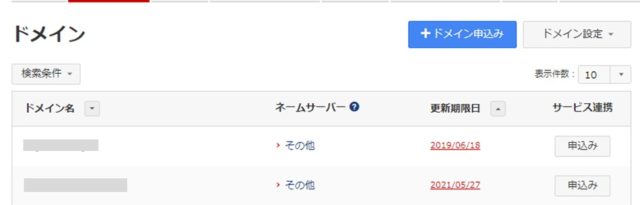
8.トップページからドメイン一覧をクリック。

9.ドメイン名をクリックするとドメイン詳細が表示される。
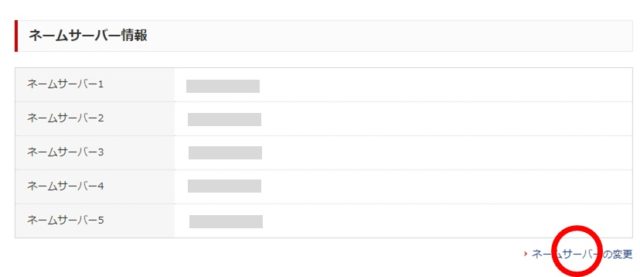
10.ネームサーバー情報からネームサーバーの変更をクリック。
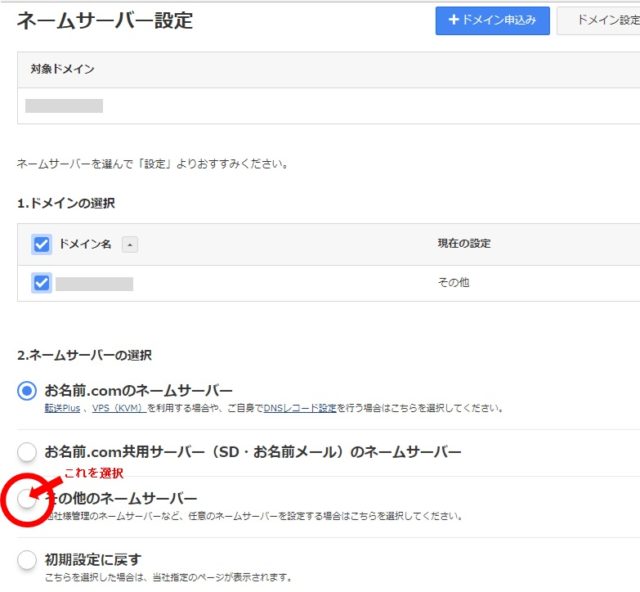
11.ネームサーバの選択をその他のネームサーバーにして、
 Xサーバーのサーバー情報に表示されているネームサーバー情報を入力する。
 

Xサーバーに戻りFTPアカウントの設定を行う。


WordPress へ

HOME へ


<スポンサードリンク>

PAGE TOP

This website stores cookies on your computer. These cookies are used to provide a more personalized experience and to track your whereabouts around our website in compliance with the European General Data Protection Regulation. If you decide to to opt-out of any future tracking, a cookie will be setup in your browser to remember this choice for one year.

Accept or Deny